⚙️ Settings tab
The server's own game settings - friendly fire, kill limits, game time, passwords - changed live, without restarting anything.
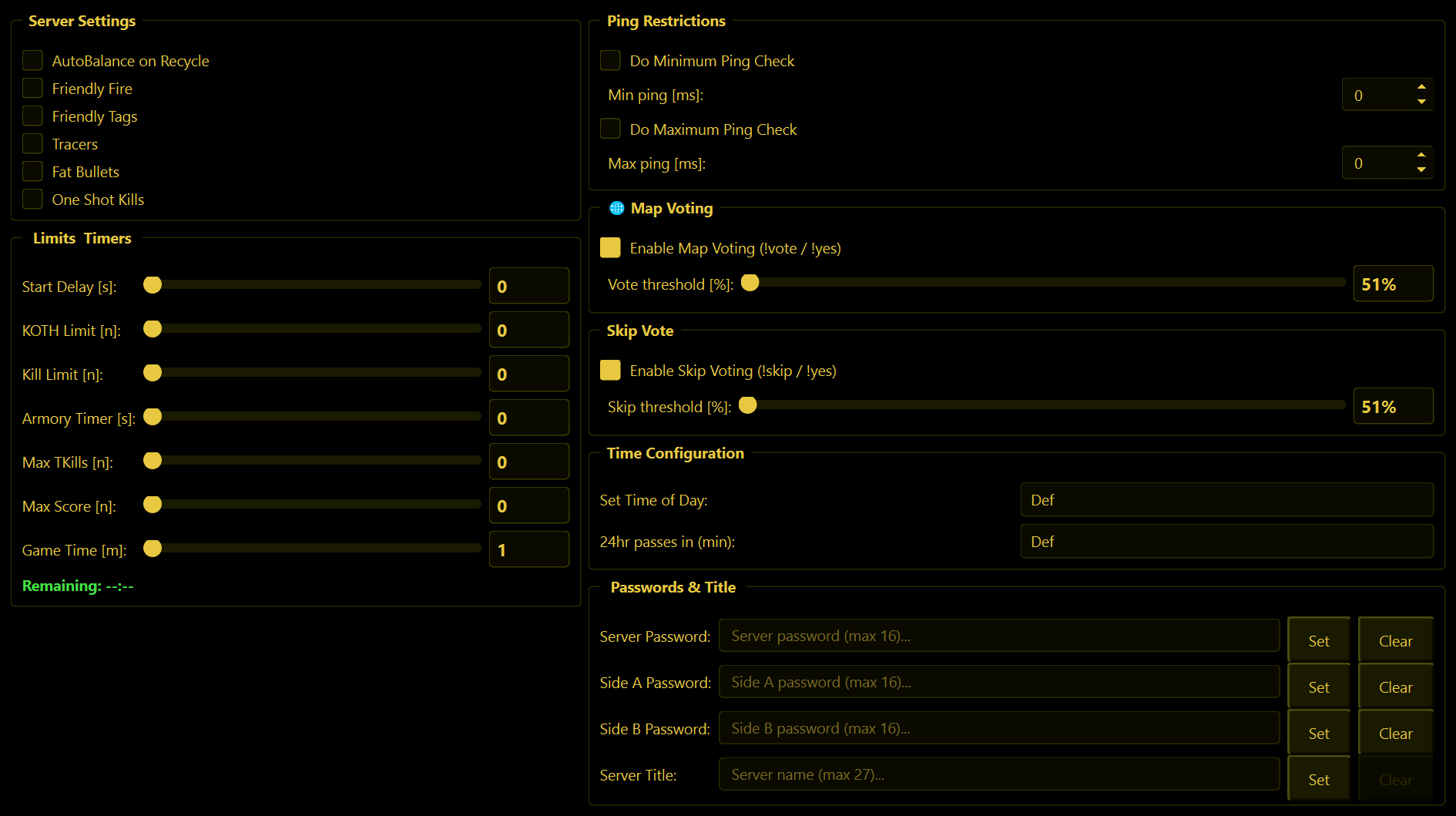
Everything here shows what the server currently has, and changes are sent the moment you make them. WolfRAT then reads the setting back to make sure the server really took it; a short confirmation like "Friendly Fire = ON" appears at the bottom of the window.
Server Settings
| Tick box | What it means |
|---|---|
| AutoBalance on Recycle | The game evens the teams up itself when a new map starts. |
| Friendly Fire | Players can hurt their own team. |
| Friendly Tags | Team-mates show a name tag. |
| Tracers | Bullets leave visible tracer lines. |
| Fat Bullets | Bullets are easier to land - more forgiving hits. |
| One Shot Kills | Any hit kills. |
Limits & Timers
Drag the slider or type the number. A slider sends its value when you let go; a typed number is sent a moment after you stop typing.
| Setting | What it means |
|---|---|
| Start Delay [s] | Seconds of waiting before a match starts (0-120). |
| KOTH Limit [n] | Score needed to win King of the Hill. |
| Kill Limit [n] | Kills needed to win a deathmatch. |
| Armory Timer [s] | The game's armory timer, in seconds (0-300). |
| Max TKills [n] | How many team kills a player is allowed. |
| Max Score [n] | Score that ends the map. |
| Game Time [m] | Length of a match in minutes (1-240). The green line underneath shows Remaining / Total. |
Game Time is also what Map Voting uses to know when the match is about to end.
Ping Restrictions
Tick Do Minimum Ping Check and/or Do Maximum Ping Check and set the numbers. Players outside the range are not allowed on the server. Most servers only use the maximum, to keep very laggy players out.
Map Voting and Skip Vote
These two boxes switch the player votes on and off:
- Enable Map Voting (!vote / !yes) - any player can type
!vote mapnameto ask for a map; others agree with!yes. - Enable Skip Voting (!skip / !yes) - any player can type
!skipto ask to skip the current map. - Threshold [%] - how much of the server has to agree (51% to 90%). At 51%, more than half.
How the votes actually run is explained on the Map Voting page. If you switch one off while a vote is running, WolfRAT tells the server the vote was cancelled.
Time Configuration
- Set Time of Day - jump the game clock to a given hour (0000 to 2300).
- 24hr passes in (min) - how fast a full day goes by, from 5 minutes to 2 hours.
Def means "leave it alone". The game does not report these back, so WolfRAT can only tell you the request was accepted, not show you the result.
Passwords & Title
| Row | What it does |
|---|---|
| Server Password | Players need this to join at all. Clear removes it and opens the server to everyone. |
| Side A / Side B Password | Players need it to join that team - handy for clan matches. |
| Server Title | The name shown in the server browser, 27 characters at most. It cannot be emptied - the game does not allow a server without a name. |
Type the new value and press Set. Passwords can be up to 16 characters.