🌦️ Weather
Change the sky on your server, live. Rain, storms, snow, fog, lightning and even earthquakes - and every player sees it with the normal game. No download for players, no server patch, no restart.
The one thing you need first
WolfRAT has to be running on the same PC as the game server. The weather works by changing numbers inside the running server, and that can only be done from the same machine. If you connect to a server somewhere else, the Weather tab stays greyed out - everything else in WolfRAT still works.
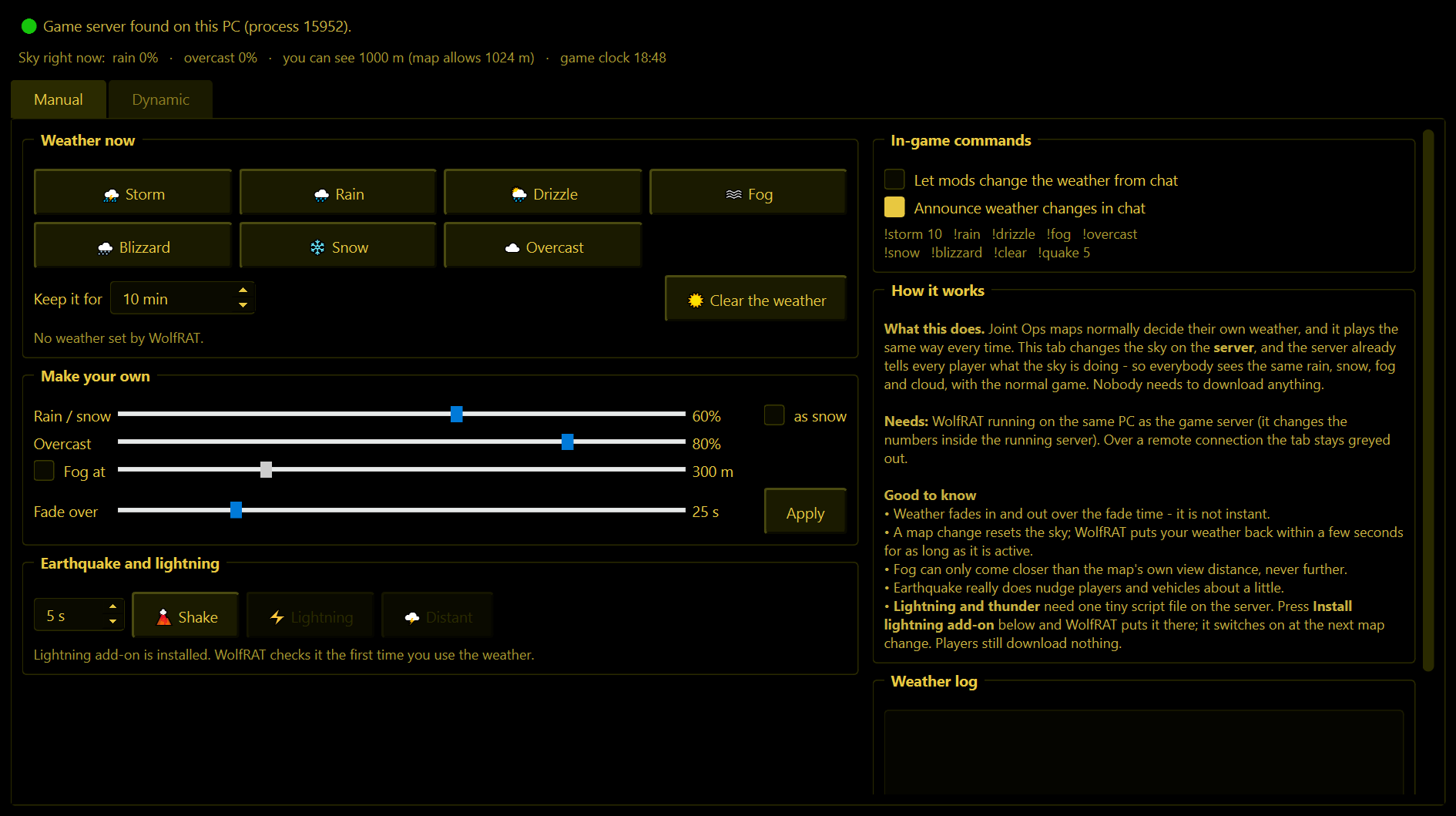
The line at the top of the tab tells you where you stand. Green dot and "Game server found on this PC" means you are good to go. Underneath it, "Sky right now" shows what the server's weather is actually doing at this moment.
Manual page - weather on demand
Weather now
One click each: Storm, Rain, Drizzle, Fog, Blizzard, Snow, Overcast. The weather fades in over about half a minute, the same way the game does it - it does not just snap on.
- Keep it for - how many minutes the weather stays. When the time is up WolfRAT clears it for you. Set it to the lowest value and it reads "until I clear it".
- Clear the weather - hands the sky back to the map. You get the map's own weather back, exactly as it was, not just a blank blue sky.
A map change resets the sky. If your weather still has time left, WolfRAT puts it back a few seconds after the new map has loaded.
Make your own
Sliders for Rain / snow amount, Overcast (how dark the cloud is), Fog at (how far players can see, in metres) and Fade over (how many seconds the change takes). Tick as snow to get snow instead of rain, then press Apply.
Fog can only come closer than the map's own view distance, never further. If a map already limits the view to 400 m, asking for 800 m does nothing.
Earthquake and lightning
- Shake - an earthquake for the number of seconds you choose. It really does nudge players and vehicles about a little, so use it for fun, not mid-firefight.
- Lightning - a flash overhead with a crack of thunder. Distant - a far-off flash and rumble.
The lightning add-on
Lightning needs one tiny script file in your server folder. You do not have to make it: press Install lightning add-on and WolfRAT puts it there for you. It switches on at the next map change (the game only reads its scripts when a map loads). The sentence under the buttons always tells you which state you are in: needs the add-on, installed and waiting for a map change, or ready.
The add-on is safe to leave in place forever - it does nothing at all unless WolfRAT asks it to. Players download nothing. If you already have your own server.wac, WolfRAT adds to it and leaves your lines alone.
In-game commands
- Let mods change the weather from chat - off by default. Tick it and the people on your Mods list can use the weather commands below.
- Announce weather changes in chat - WolfRAT tells the server when weather is on its way.
| A mod types | What happens |
|---|---|
!storm 10 | Storm for ten minutes. The number is optional on all of these. |
!rain !drizzle !snow !blizzard !fog !overcast | The other skies. |
!clear | Back to the map's own weather. |
!quake 5 | Earthquake, 1 to 40 seconds. |
!lightning | A flash and thunder (needs the lightning add-on). |
!weather on | Switches the changing weather on. Add how often: !weather on rare, normal, frequent, always, or !weather on custom 5 20 for a front every 5 to 20 minutes. |
!weather off | Switches the changing weather off. The sky goes back to the map's own. |
!weather status | Says whether it is on, and how often. |
Dynamic page - weather that changes on its own
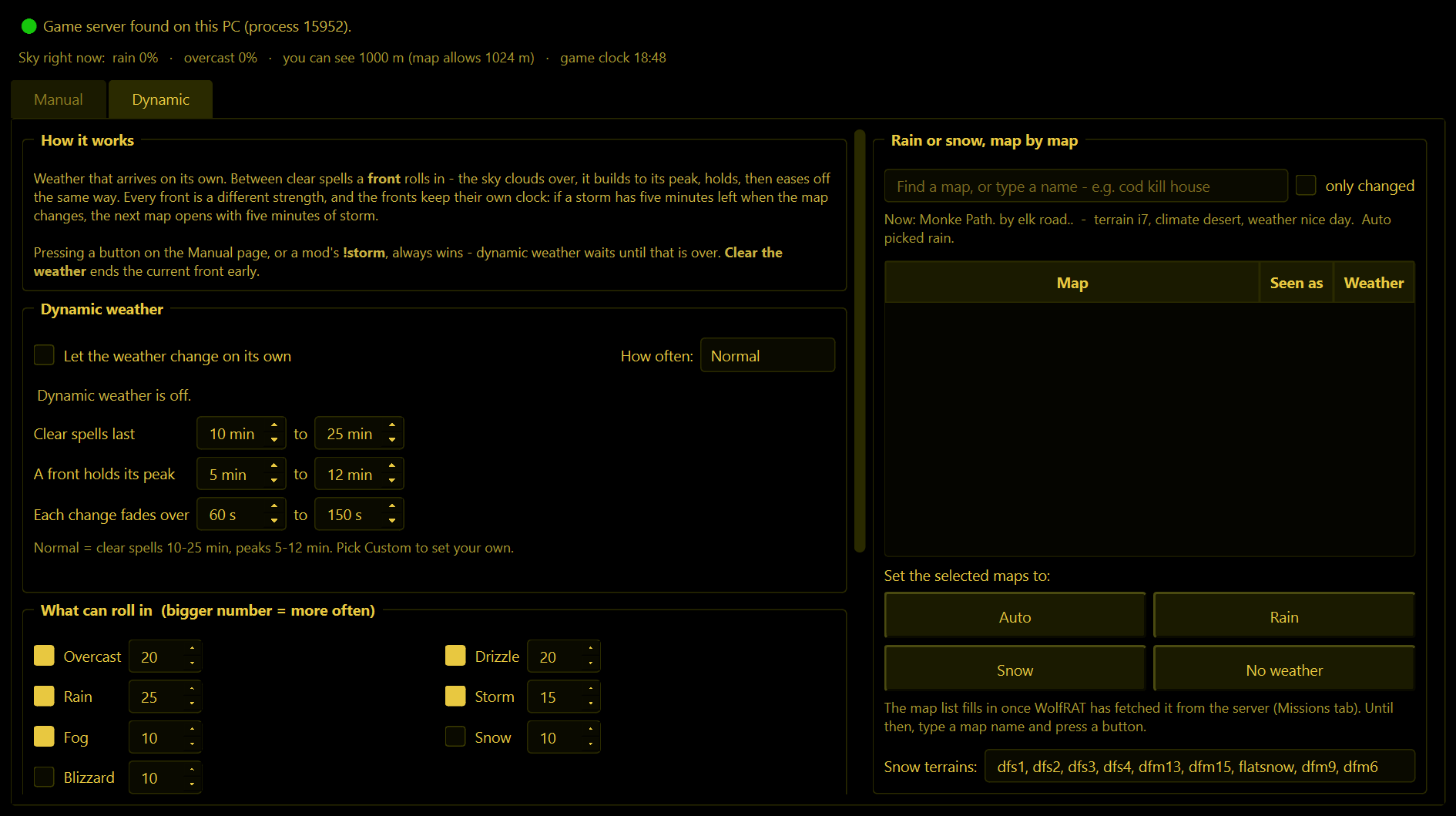
Tick Let the weather change on its own and the server gets real weather: a clear spell, then a front rolls in - the sky clouds over, it builds to its peak, holds, then eases off again - then another clear spell. Every front is a different strength and length, so no two rounds feel the same.
How often
| Setting | Clear sky between fronts |
|---|---|
| Rare | 25 to 60 minutes |
| Normal | 10 to 25 minutes |
| Frequent | 4 to 10 minutes |
| Almost always | 1 to 2 minutes |
| Custom | You set the minutes yourself in the boxes underneath. |
What can roll in
Tick the kinds of weather you want and give each a number - a bigger number means it turns up more often. The line underneath works it out for you in plain terms ("out of 100 fronts: rain 28, storm 17..."). You can also set how thick the fog may get, let storms flash with lightning at their peak, and allow the odd rare earthquake (off by default).
Rain or snow, map by map
On Auto, WolfRAT looks at the map that is loaded and decides for itself: snow maps get snow and blizzards, everything else gets rain and storms. You will see its reasoning in the "Now:" line. If it gets one wrong, select the map in the list and press Rain, Snow or No weather to take over. Auto hands the decision back.
- The map list fills in once WolfRAT has fetched your maps (Missions tab). Until then you can type a map name and press a button - close spellings are understood.
- Snow terrains is the list of terrain names WolfRAT treats as snowy. You can add to it.
Things it does to stay out of the way
- Maps with their own weather are respected. Some maps script their own rain or fog. WolfRAT only touches the sky while one of its own fronts is showing, and afterwards puts the sky back exactly as it found it. A map set to No weather is never touched.
- Manual always wins. Press a button on the Manual page, or have a mod type
!storm, and the dynamic weather waits until that is over. - Fronts keep their own clock. If a storm has five minutes left when the map changes, the next map opens with five minutes of storm.
- Nothing is written while a map is loading.
If you close WolfRAT while weather is showing, that sky stays until the next map change - WolfRAT is no longer there to clear it.